
What a Class Reunion Taught Me About Building Better Zoho Processes
Most businesses don't have a software problem. They have a process problem.
They may already have Zoho CRM, Forms, WorkDrive, Writer, or even Zoho One, but each application is being used independently. A form collects information. Someone exports it to a spreadsheet. Another person updates CRM. Documents are created manually. Files live somewhere else. Emails are sent when someone remembers to send them.
The individual tools work. The process between them doesn't.
I recently had an opportunity to build something very different from the typical CRM implementation: the complete digital infrastructure for a 20-year high school reunion.
On the surface, a class reunion has very little to do with sales or business operations. But once we started mapping the process, the similarities were hard to miss.
We needed to collect information from people, maintain accurate records, understand where each person was in a process, collect payments, send different communications based on status, generate personalized documents, organize files, and provide useful information to the people managing the event.
Sound familiar?
Start With the Process, Not the App
The reunion committee originally had a Facebook group. What they didn't have was a system.
There was no established process for collecting contact information, tracking interest, managing RSVPs, accepting payments, gathering photos, communicating updates, or keeping everything organized.
So before building anything in Zoho, I mapped the entire journey.
Someone might first express interest. Later, they might submit information for the Memory Book. Eventually, they would RSVP, purchase a ticket, receive confirmation, get event information and receive reminders.
Other people might not attend at all but still participate in the Memory Book. Someone might become a sponsor or donor. Each action needed to update what we knew about that person and determine what should happen next.
That's exactly how I recommend approaching a business process.
Don't start with, "What can we build in Zoho CRM?"
Start with, "What needs to happen from beginning to end?"
Then determine which applications should support each part.
Give Your Data a Home
For the reunion, that home was Zoho CRM.
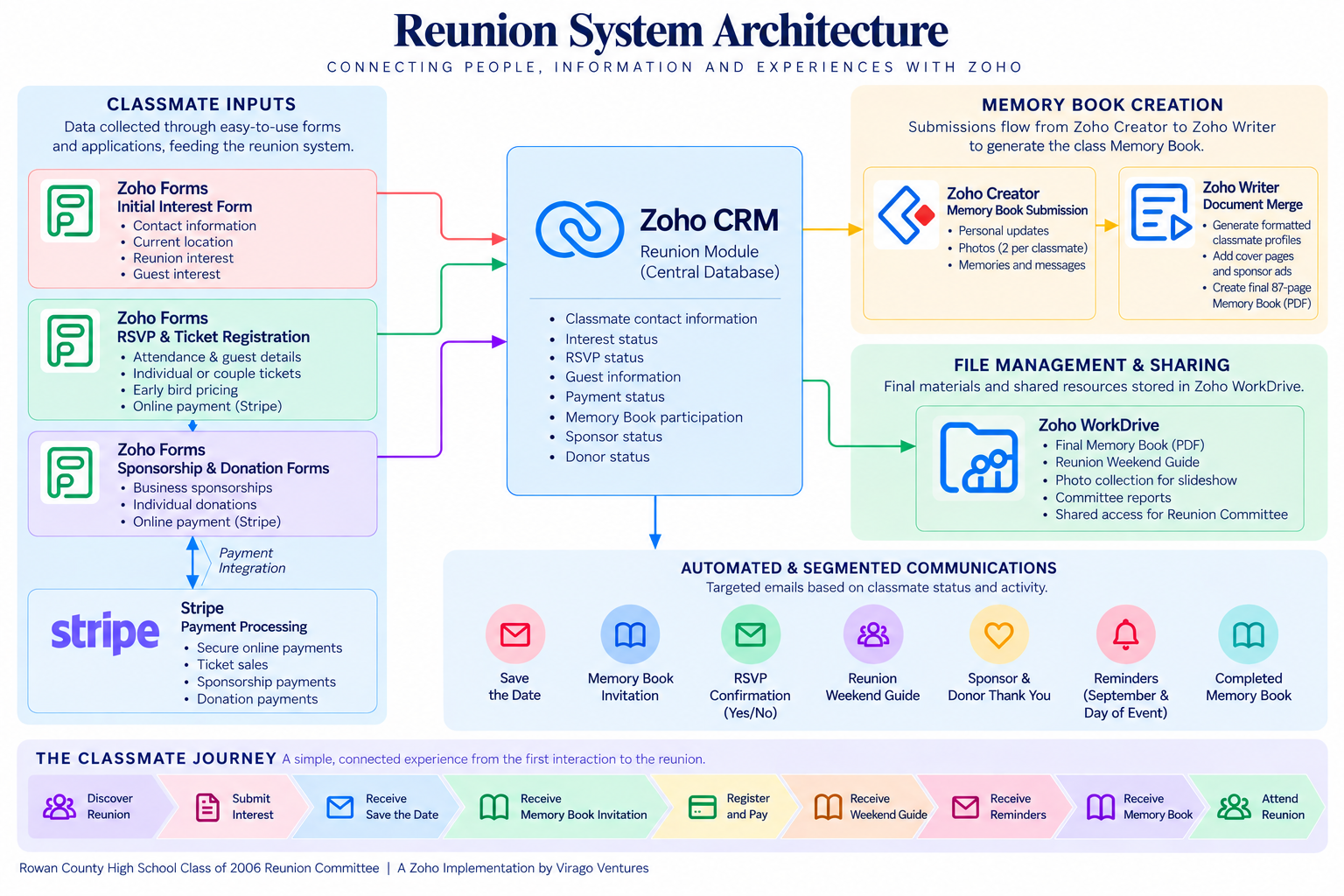
We created a custom Reunion module that became the central record for each classmate. Forms and other processes updated those records with information such as contact details, interest, RSVP status, payment status, Memory Book participation, sponsorships and donations.
The committee didn't even need to use CRM themselves. Virago Ventures maintained the system and surfaced the information they needed through reports and shared resources.
There's an important lesson here for businesses: not everyone needs to work in every system.
Your CRM can be the operational source of truth while employees, customers, vendors or other stakeholders interact with simpler tools designed specifically for them.
Let Each Zoho App Do What It Does Best
Instead of forcing one application to handle everything, we used different Zoho products for different parts of the process.
Zoho Forms collected interest, RSVPs, ticket purchases, sponsorships and donations.
Zoho CRM maintained the central database and controlled segmentation and automation.
Zoho Creator handled the more specialized Memory Book submission process.
Zoho Writer turned the information collected through Creator into formatted classmate profiles.
Zoho WorkDrive provided shared access to reports, photos, event resources and the completed Memory Book.
Stripe handled payment processing through the forms.
None of these applications was particularly complicated on its own. The value came from how they worked together.
That's often where I see businesses leave the most value on the table with Zoho
Automate the Handoffs
Once the applications were connected, the next question was simple:
What should happen automatically?
When someone entered the system, they received a Save the Date and then a Memory Book invitation.
When someone RSVP'd yes, their record was updated and they received the appropriate confirmation and Reunion Weekend Guide.
An RSVP of no triggered a different response.
Sponsor and donor submissions updated the appropriate statuses and generated their own thank-you communications.
Scheduled communications and reminders could then be sent to the right groups based on information already stored in CRM.
We ultimately created five primary CRM workflows and 12 email templates, with email open rates ranging from 53% to 80%.
The important part wasn't the number of workflows. It was that the system knew what should happen next.
That's the same question businesses should be asking about leads, customers, orders, projects, renewals, support requests and virtually every other repeatable process.
Use the Data More Than Once
One of my favorite parts of the project was the Memory Book.
Forty classmates submitted information and photos through Zoho Creator. Instead of manually copying that information into a document 40 times, the data was merged through Zoho Writer to create formatted profiles.
Those profiles became part of an 87-page digital Memory Book distributed to the class before the reunion.
The same principle applies to everyday business operations.
If you've already collected a customer's information, why is someone typing it into a proposal?
If an order already exists in CRM, why is someone recreating the information for another department?
If a customer completes a form, why does an employee have to copy those answers somewhere else?
Good automation isn't just about sending emails. It's about eliminating unnecessary re-entry and allowing information you've already collected to continue moving through the process.
The Goal Isn't More Automation
By the time the reunion took place, approximately 95 people attended, including roughly 50 members of the graduating class. The committee had accurate information for food planning, name tags, guest counts and event-day check-in. Classmates had received consistent communication throughout the process, and the completed Memory Book helped people reconnect before they even arrived.
But the best result wasn't that we used five Zoho applications.
It was that the technology largely disappeared for the people using it.
Classmates filled out forms, received relevant emails, paid for tickets, uploaded photos and got the information they needed. They didn't need to understand what was happening behind the scenes.
The reunion committee didn't need to become CRM administrators either.
That's what a well-designed business process should feel like.
Your customers shouldn't have to understand your CRM. Your employees shouldn't have to remember 15 manual steps. And your team shouldn't need another spreadsheet just to bridge the gap between two systems that already contain the information.
What Does This Look Like in Your Business?
A reunion may be an unusual Zoho use case, but the process behind it isn't.
Replace classmate with lead, customer, member, applicant, vendor or client.
Replace RSVP with quote acceptance, onboarding, registration, order, renewal or service request.
The architecture starts looking a lot less unusual.
A form captures information. CRM becomes the source of truth. Status changes trigger the next action. Documents are generated from existing data. Files are organized and shared with the right people. Reports give internal teams visibility into what's happening.
That's the real advantage of the Zoho ecosystem: not simply having access to a lot of applications, but being able to design a process where those applications work together.
Ready to Connect the Pieces?
If you're using several Zoho applications but your team is still copying information between systems, maintaining spreadsheets, manually following up with customers, or relying on someone to remember what happens next, there's probably an opportunity to simplify the process.
Virago Ventures' CRM Review looks beyond individual features to evaluate how your CRM, automation, data, integrations and connected Zoho applications are working together. You'll receive a detailed assessment of your current setup, prioritized recommendations, and a roadmap for improving the processes that are creating unnecessary work for your team.
Ready to see where your Zoho system could work smarter? Contact Virago Ventures to schedule a CRM Review.