
Zoho Campaigns has introduced a major update, and if you're currently using the platform, it's worth taking a closer look at what's changing before making the switch.
Zoho Campaigns 3.0 brings a redesigned interface, improved marketing automation, AI-powered content creation, enhanced reporting, and expanded multichannel marketing capabilities.
I recently completed the migration of my own Zoho Campaigns account and wanted to share what businesses should know before upgrading.
While the migration itself is relatively straightforward, there are several important considerations that can affect your existing setup.
What's New in Zoho Campaigns 3.0?
The new version introduces several improvements designed to simplify campaign management and expand your marketing capabilities.
Some of the highlights include:
Redesigned Interface: An updated experience for creating and managing marketing campaigns.
AI-Powered Content Creation: Zia-powered tools to assist with generating marketing content.
Enhanced Marketing Automation: Updated workflow capabilities for managing customer journeys.
Improved Reporting: Additional tools for understanding campaign performance and engagement.
Expanded Marketing Channels: Support for managing email, SMS, and WhatsApp marketing.
These updates offer new opportunities for businesses to improve how they communicate with their audiences.
However, moving to Campaigns 3.0 involves more than simply adopting a new interface.
What Should You Review Before Migrating?
Zoho has outlined several prerequisites for existing Campaigns accounts. The requirements vary depending on how your account is currently configured.
Here are some of the most important areas to review.
Topic Management, Integrations, and User Management
Zoho previously introduced updates to how Topics, integrations, and users are managed within Campaigns.
These updates have been available for some time, and many businesses may have already completed them.
Before migrating to Campaigns 3.0, confirm that your account is using the updated versions of all three.
If you've already completed these migrations, you can focus on the remaining requirements.
CRM Integrations and Contact Syncs
If your Campaigns account is connected to Zoho CRM or another application, it's important to review your integration and sync configurations.
Although the connected application can remain connected during migration, certain existing sync configurations may not carry over.
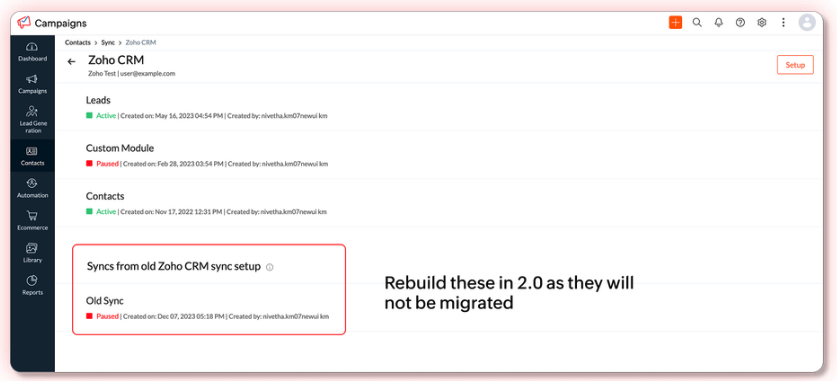
Depending on when those configurations were created, they may need to be rebuilt before switching to Campaigns 3.0.
This is particularly important for businesses that rely on CRM data to maintain marketing lists and audience segments.
User Roles and Permissions
User permissions are another important consideration.
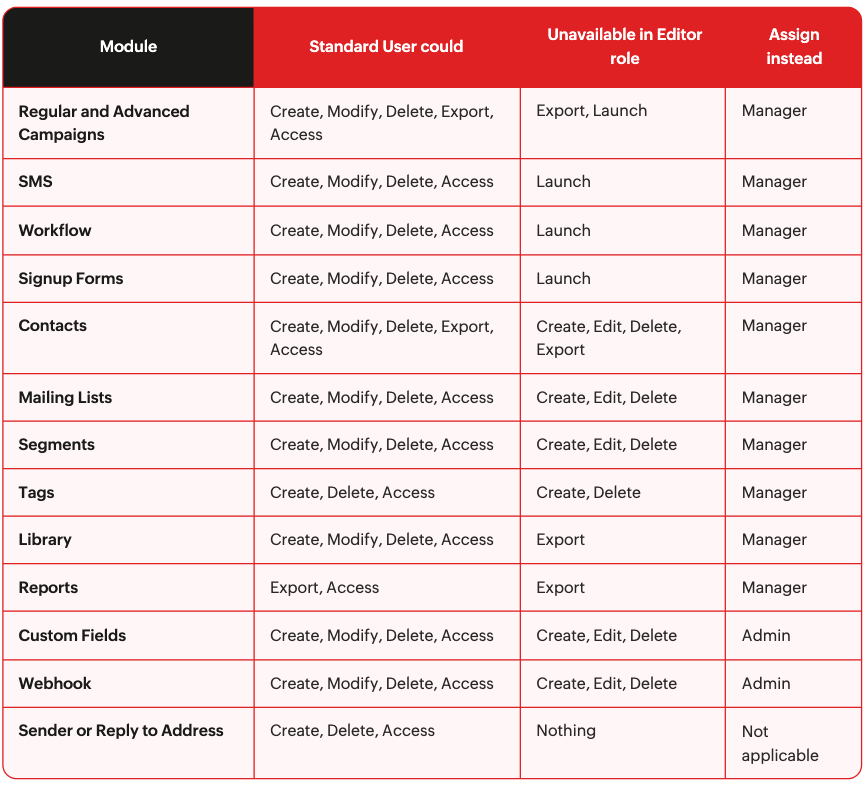
Under the updated user management system, the Editor role has more limited permissions than the previous Standard User role.

For example, Editors cannot launch email campaigns.
If you have team members responsible for creating and sending marketing emails, verify that their assigned roles provide the necessary permissions.
Otherwise, someone who previously managed campaigns may discover they can no longer send them.
Segments and Contact Scoring
Businesses using advanced segmentation or contact scoring should review their existing configurations.
Some Bulk Segment conditions may not migrate completely, and segments that have been inactive for more than 120 days will be paused after migration.
Campaign-based contact scoring configurations may also need to be rebuilt.
Identifying these items ahead of time helps reduce unexpected changes to your marketing processes.
Draft Campaigns
Not every campaign draft will migrate to the new version.
Certain older campaign types, including unsent Coupon, Forms, and mail-in campaign drafts, will not carry over.
Before migrating, review your existing drafts and save any content you may want to reuse.
It's also important to check for scheduled campaigns using deprecated campaign types, as these can prevent the migration from proceeding.
What Happens During the Migration?
Once your account has completed the necessary preparation and Zoho has enabled the migration, an administrator can initiate the switch.
The migration moves the entire organization to Campaigns 3.0 at once.
Zoho estimates that the process generally takes up to 30 minutes, although larger accounts may require more time.
During that window, users cannot work in the Campaigns web interface.
Scheduled campaigns, API calls, inbound syncs, signup forms, and webhooks continue operating. However, marketing workflows are temporarily paused.
It's worth planning the migration for a time when your team is less active in Campaigns, especially if you rely heavily on automated customer communications.
One important consideration: The migration is permanent. Once you've moved to Campaigns 3.0, you cannot revert to the previous version.
How to Migrate to Zoho Campaigns 3.0: Step by Step
Once you've reviewed the prerequisites and confirmed your account is ready, you can begin the migration process.
Step 1: Complete Your Pre-Migration Checklist
Review your account for any outstanding requirements, including integrations, user permissions, segments, contact scoring, and campaign drafts.
If you see an Action Required notification in Zoho Campaigns, review and complete the applicable items before proceeding.
Step 2: Contact Virago Ventures to Contact Zoho Partner Support
Currently, migrations must be enabled by the Zoho Partner support team. You will need a Partner to reach out on your behalf to request migration to Campaigns 3.0, send an email to contact@viragoventures.com for assistance.
Zoho will review your account and provide information about what will and will not migrate. Once you've reviewed the information and confirmed you'd like to proceed, Zoho can enable the migration option.
Step 3: Initiate the Migration
Once Zoho has enabled migration, an administrator can log in to Campaigns and select Switch to new version.
You'll be prompted to:
Select I agree to switch to the new version.
Review and accept the updated Terms and Conditions.
Click Switch to new version to begin.
Remember, this action migrates the entire organization, and the change cannot be reversed.
Step 4: Allow the Migration to Complete
Zoho estimates that migration generally takes up to 30 minutes, although larger accounts may take longer.
During this time, users cannot access the Campaigns web interface. However, scheduled campaigns, incoming syncs, signup forms, and API calls continue operating.
Marketing workflows are temporarily paused. Contacts that meet a workflow trigger during the migration will not be added to that workflow later, so it's best to schedule the migration during a quieter period.
Step 5: Review Your Account After Migration
Once the migration is complete, your organization will be using Zoho Campaigns 3.0.
Before resuming normal marketing activities, take a few minutes to verify that your integrations, contact syncs, user permissions, segments, and workflows are functioning as expected.
This is especially important if your account relies on automated campaigns or integrations with Zoho CRM.
My Experience Migrating to Campaigns 3.0
I recently completed the migration of my own Zoho Campaigns account successfully.
The experience reinforced the importance of reviewing your existing configuration before initiating the upgrade.
Even if your account appears ready, it's worth checking the details that may affect your marketing operations, particularly integrations, user permissions, and existing campaign content.
A little preparation can help make the transition much smoother.
Ready to Move to Zoho Campaigns 3.0?
If your business is currently using Zoho Campaigns, now is a good time to evaluate your readiness for the new version.
At Virago Ventures, we help businesses manage and optimize their Zoho systems, including reviewing existing configurations, identifying potential migration issues, and preparing accounts for platform updates.
If you're considering the move to Campaigns 3.0, we can help you assess your account and determine what needs to be addressed before migrating.
Contact Virago Ventures to schedule a Zoho Campaigns 3.0 migration readiness review.