
Zoho Campaigns 3.0: What’s Changing and What It Means for Your Marketing
Zoho Campaigns is getting a significant, much-needed overhaul.
Campaigns 3.0 isn't simply a new interface. Zoho has rebuilt and expanded several core areas of the platform, including the email editor, segmentation, contact management, CRM synchronization, analytics, and multi-channel marketing. Email remains a major part of Campaigns, but SMS and WhatsApp are becoming much more integrated into the overall marketing experience.
For businesses already using Zoho Campaigns, there is an important caveat: Campaigns 3.0 is initially rolling out to new sign-ups only. Existing Campaigns accounts are not being automatically migrated yet, and Zoho is still finalizing that migration process.
That means you may not see these changes in your account today. But there is enough here to start understanding what Campaigns is becoming, and which improvements could make the biggest difference once they're available to you.
A Cleaner, More Usable Campaigns Experience
One of the first changes users will notice is the redesigned interface.
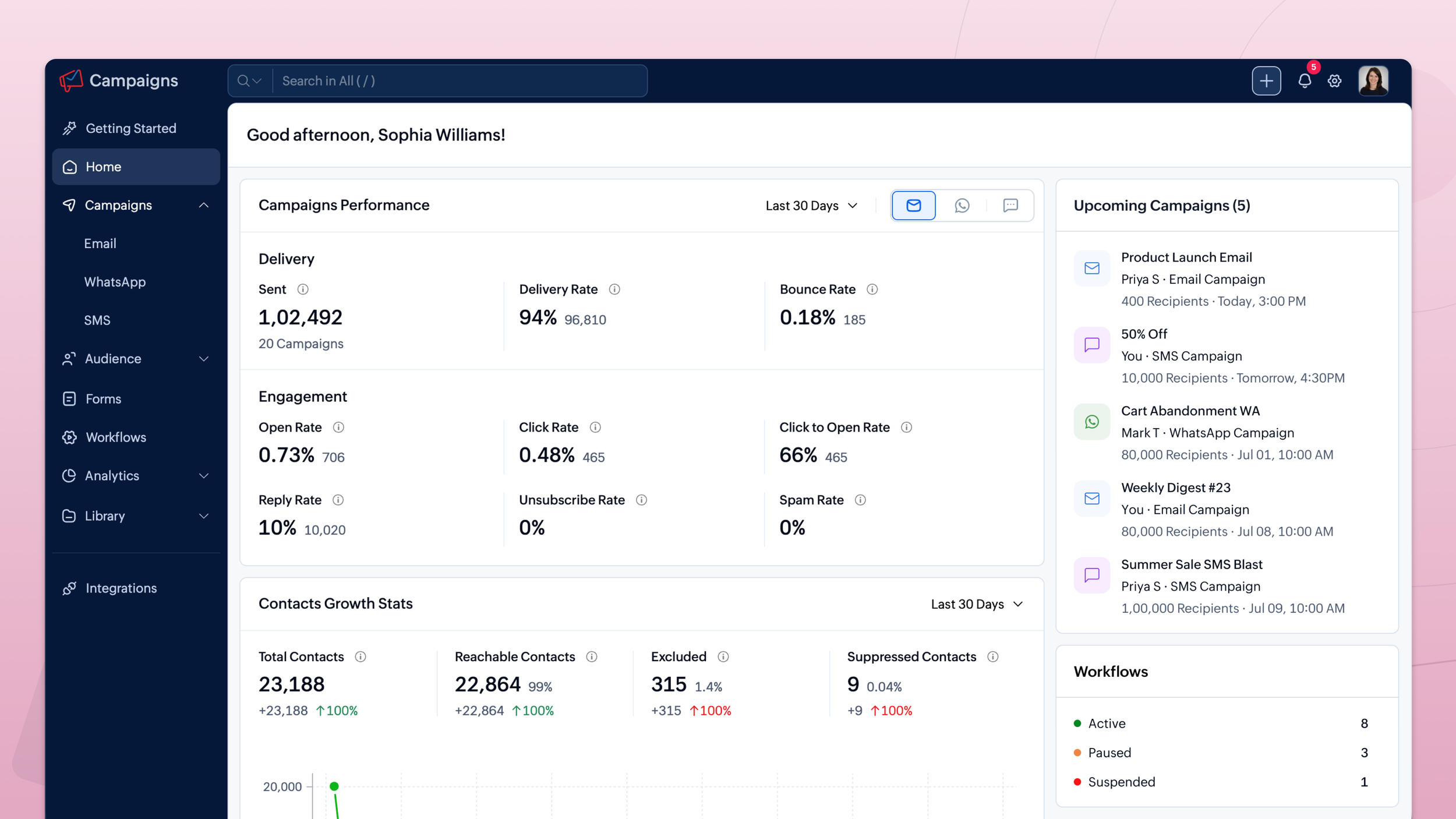
Campaigns 3.0 introduces cleaner list views along with custom views and advanced filtering, making it easier to find and work with information without constantly moving between screens.
That may not sound like the biggest announcement in the release, but usability matters in a marketing platform. As contact databases grow and campaigns become more sophisticated, simply finding the right contacts, campaigns, or information can become unnecessarily time-consuming.
The new interface is designed to make those everyday tasks easier and give users more control over how they organize and work with their data.
Email, SMS, and WhatsApp Are Coming Together
One of the larger changes in Campaigns 3.0 is its stronger multi-channel approach.
Email campaign creation has been streamlined, with fewer setup steps and improved recipient management. Lists and segments can be used with exclusions, and marketers will be able to see a clear recipient count before sending.
A/B testing is also becoming more flexible. Rather than testing only one element, businesses can test subject lines, sender addresses, and contentsimultaneously!
Reporting provides more visibility as well. Instead of simply seeing aggregate delivery numbers, users can see the delivery status of individual emails, including whether a message is queued, delivered, bounced, or deferred.
Zoho has also made significant improvements to sending speed. According to its Campaigns 3.0 announcement, sending 100,000 emails has been reduced from roughly an hour to approximately 15–20 minutes.
But email is only part of the change.
Campaigns 3.0 adds WhatsApp campaigns using approved templates, WhatsApp steps within workflows, action-triggered messages, and delivery and engagement reporting. SMS setup and campaign creation have also been simplified.
Most importantly, Zoho is introducing frequency capping across email, SMS, and WhatsApp.
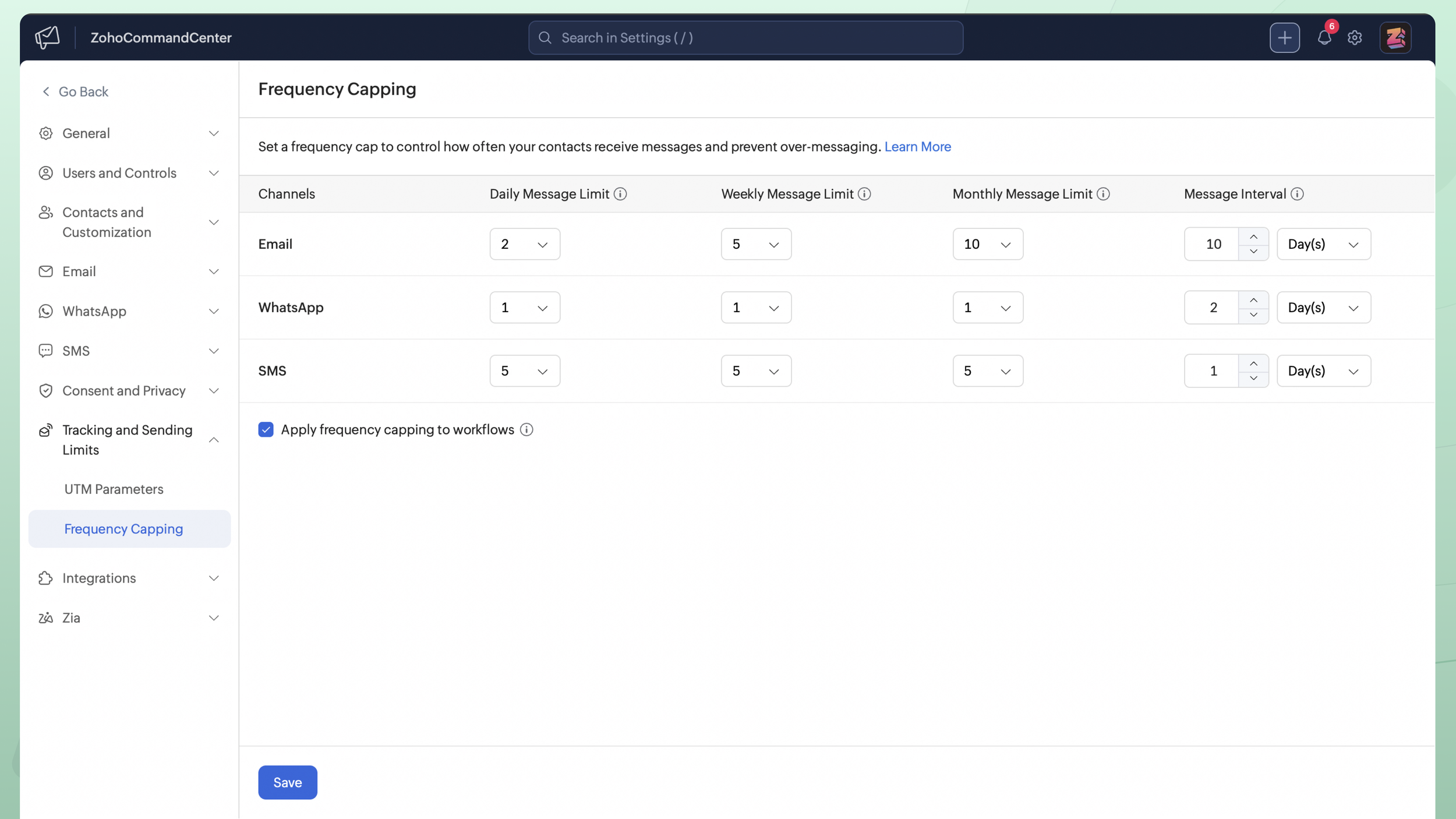
For businesses using multiple channels, that's a practical improvement. A contact shouldn't receive an email campaign, a text message, and a WhatsApp message in rapid succession simply because each channel is managed separately. Frequency capping gives marketers a way to control the overall volume of communication a contact receives.
The goal shouldn't be to use every available channel. It should be to use the right channel at the right time without overwhelming your audience.
The Email Template Editor Has Been Rebuilt
For many Campaigns users, this may be the most immediately noticeable improvement.
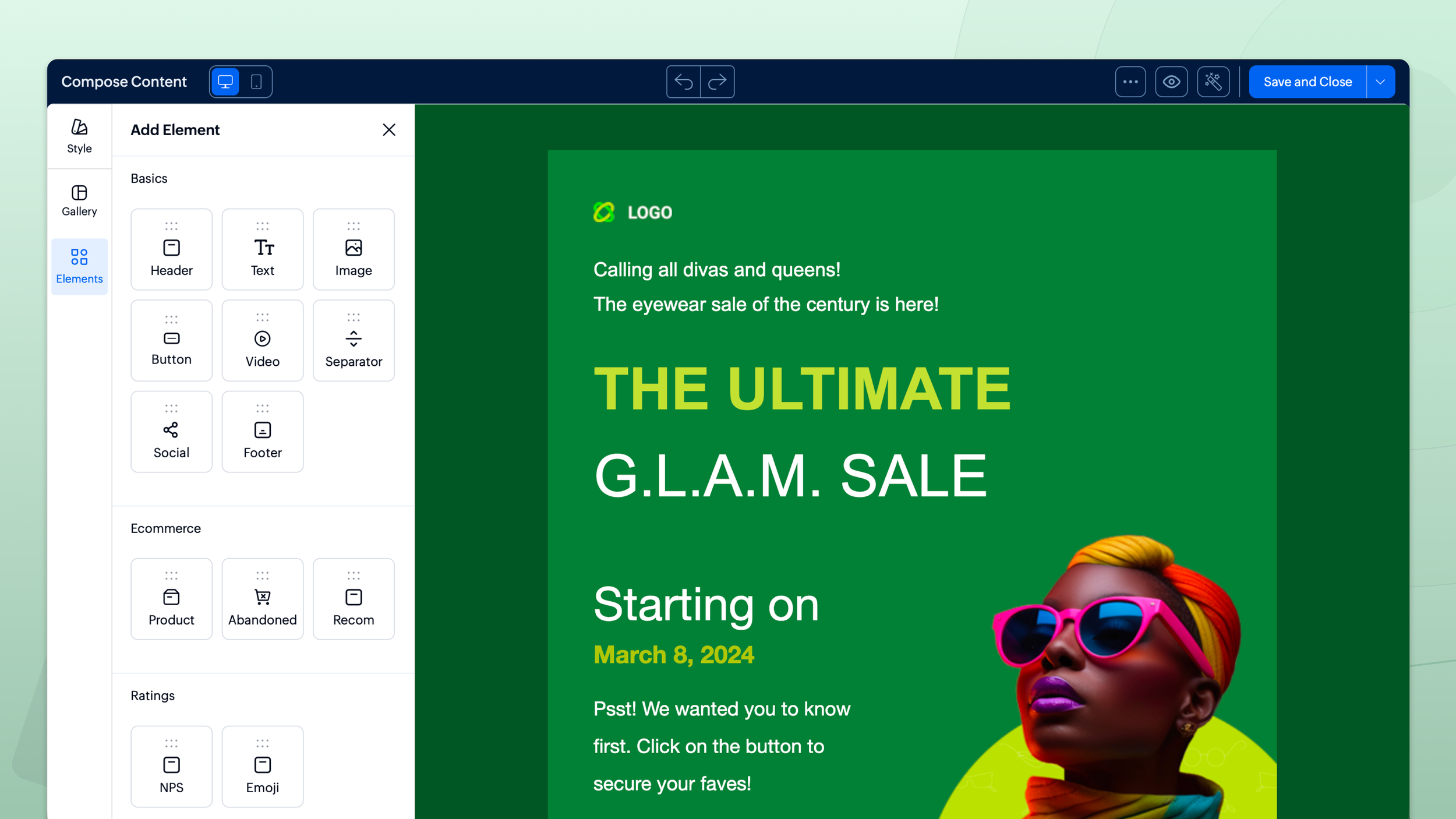
The template editor has been rebuilt from scratch and provides significantly more control over email design. Users can adjust backgrounds, images, spacing, padding, borders, and layout settings at the section level rather than fighting against a more restrictive editor.
There's also a dedicated mobile design view.
Instead of simply hoping a desktop email translates well to a smaller screen, marketers can separately fine-tune how their campaigns appear on mobile devices.
Reusable content is improving too. Frequently used blocks can be saved and reused, while centralized design settings make it easier to maintain consistent branding across campaigns.
Zoho has also reduced the size of the HTML generated by the editor. That's a behind-the-scenes improvement, but an important one: leaner emails are less likely to be clipped by major email clients and should render more consistently across inbox providers.
For businesses regularly building newsletters, promotions, or nurture campaigns, these changes address some of the very practical frustrations that come with email creation.
More Personalized Content Without Creating More Emails
Dynamic content is also being revamped, although Zoho notes that the enhanced functionality is expected in a subsequent update rather than the initial Campaigns 3.0 release.
The new version will allow marketers to set more advanced criteria and display different content blocks to different audiences within a single email.
For example, a company serving multiple industries could send one newsletter but change a section of the email based on each contact's industry. A software company could show different product information based on which solution a customer uses.
Instead of creating multiple versions of essentially the same campaign, one campaign can adapt to different segments.
That's where personalization becomes useful; not simply inserting someone's first name into a subject line, but delivering content that is actually more relevant to the recipient.
Segmentation Is Getting Much More Powerful
Good marketing automation depends heavily on good segmentation.
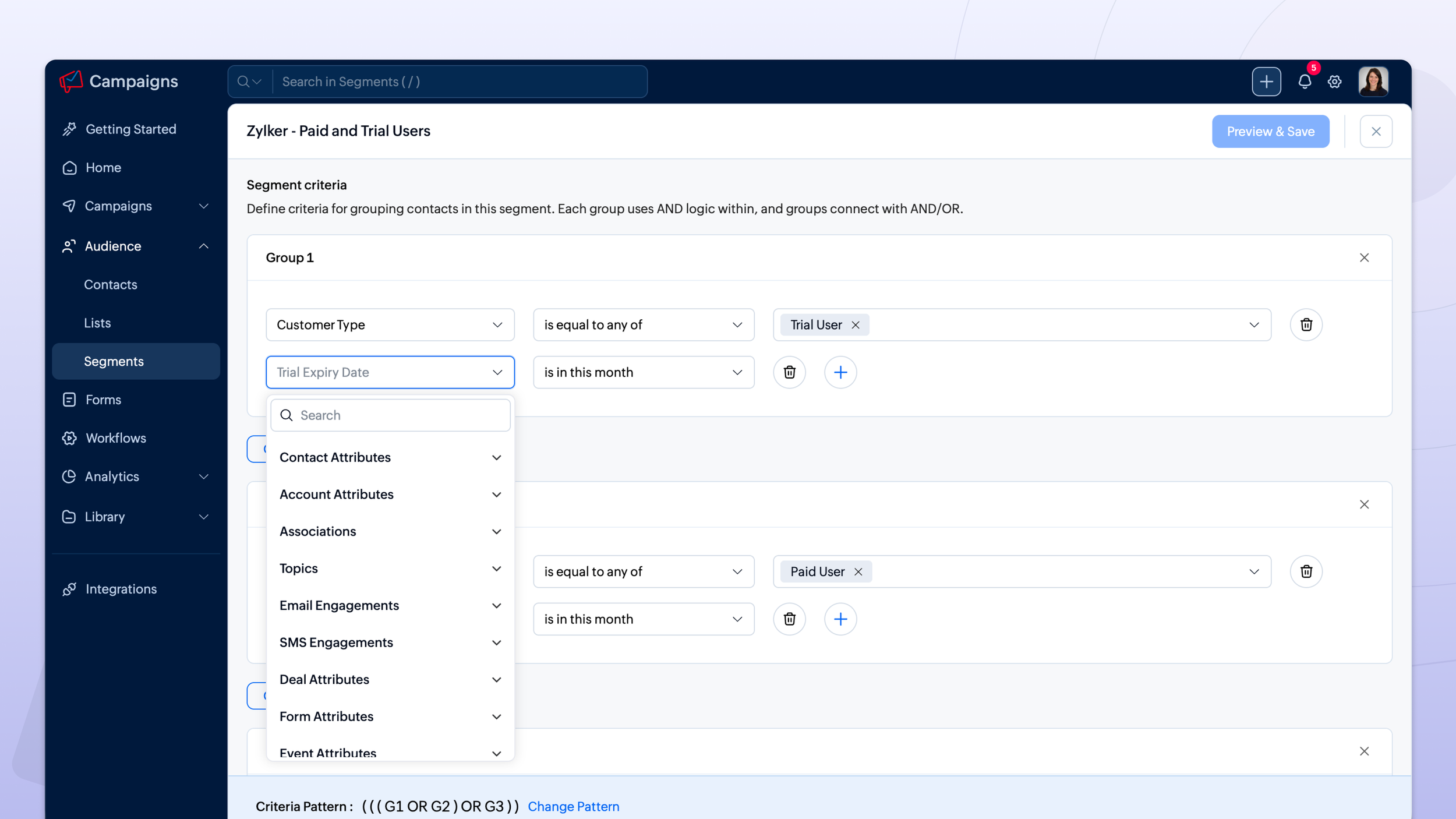
Campaigns 3.0 allows businesses to build more sophisticated segments using multiple criteria, engagement metrics, and layered groups of conditions.
That creates more flexibility for targeting audiences based on both who they are and how they've interacted with your marketing.
Instead of creating a broad segment such as "Customers," you could potentially narrow an audience based on customer characteristics and engagement behavior to identify the people most relevant to a particular campaign.
More segmentation options aren't automatically better, though. If your CRM data is inconsistent or your segmentation strategy isn't clearly defined, adding more conditions can simply create more complicated lists.
The businesses that will get the most value from this feature will be the ones that first determine who they actually need to reach and why, then build their segments around that strategy.
CRM Sync Is Getting Smarter
For businesses using Zoho CRM and Campaigns together, this is one of the updates I think is particularly important.
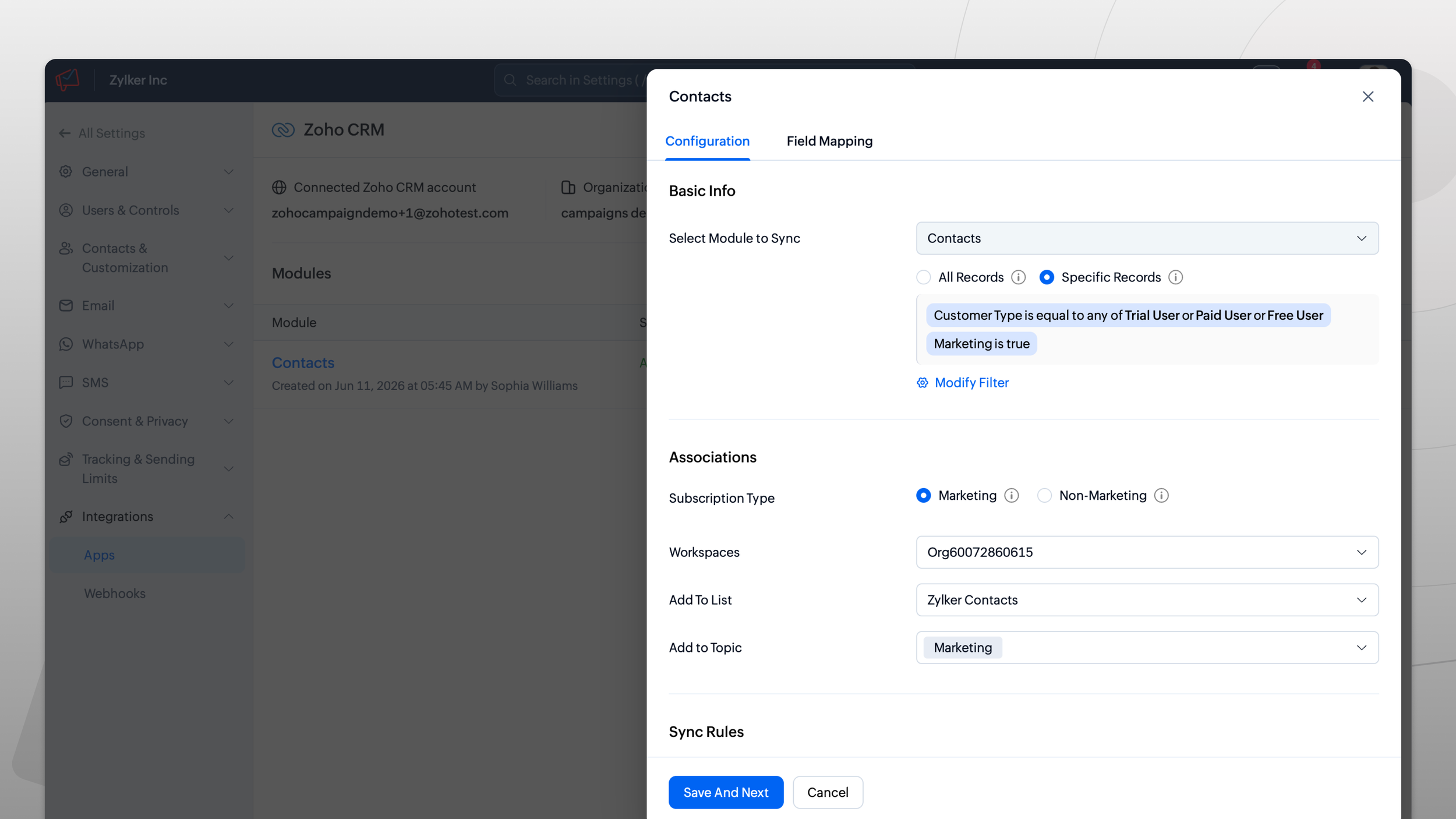
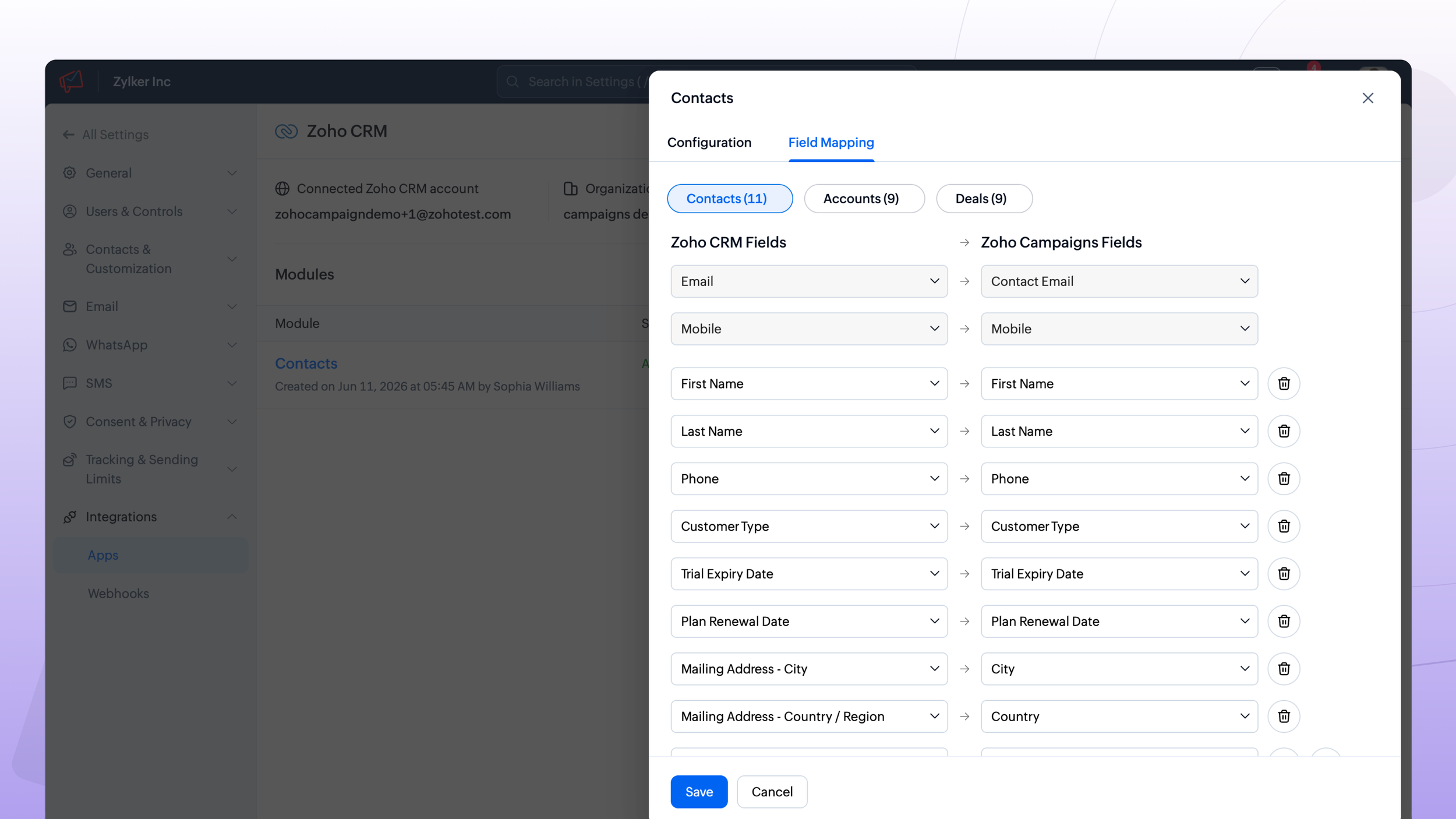
Campaigns 3.0 improves the CRM synchronization process by allowing businesses to pull either all contacts or only records matching specific criteria. CRM custom views can also be imported directly into mailing lists rather than recreating the same filtering logic separately inside Campaigns.
Campaigns can also be created using CRM data without having to switch between products.
This addresses a common problem I see with CRM and marketing systems: businesses end up maintaining slightly different audience logic in multiple places.
If your sales team already has a CRM view identifying a specific group of customers or prospects, you shouldn't necessarily have to rebuild that audience from scratch in your marketing platform.
Better alignment between CRM and Campaigns can make segmentation easier to maintain and reduce the chance that your sales and marketing systems are working from different definitions of the same audience.
Contact Management and Imports Are Getting Easier
Contact management has received several practical improvements as well.
The import process has been rebuilt with a more guided workflow, and custom fields can now be created during the import itself. Import history also provides clearer information about which records were added, updated, or ignored; and why records were skipped.
Import performance has improved significantly too. Zoho reports that an import of 100,000 contacts that previously took approximately 30 minutes can now be completed in about six minutes.
Users will also have access to shareable custom views, a richer contact timeline, and native tagging for individual contacts or bulk selections.
For smaller databases, these improvements may simply make Campaigns easier to manage. For organizations dealing with large contact volumes, they could eliminate a meaningful amount of administrative work.
Better Analytics Across the Marketing Journey
Campaigns 3.0 introduces dedicated dashboards for Email, SMS, and WhatsApp, along with Contact and E-commerce Dashboards.
For e-commerce businesses, the new dashboard provides visibility into metrics such as ROI, revenue, orders, and cart performance.
The Zoho Analytics integration is also becoming deeper. Marketing data can be synchronized into Analytics, including contact fields and activity across email, SMS, WhatsApp, and workflows.
This creates an opportunity to look beyond individual campaign metrics and understand marketing performance more holistically.
Campaigns 3.0 also introduces unified contact scoring across the three communication channels and UTM parameter management for more consistent campaign tracking.
That's an important shift. Opens and clicks can tell you how an individual campaign performed, but they don't necessarily tell you which marketing activities are contributing to pipeline and revenue. Connecting Campaigns data with CRM and broader analytics is where reporting becomes much more valuable.
AI Is Being Added, but Not Everything Is Here Yet
As expected, AI is part of the Campaigns 3.0 roadmap.
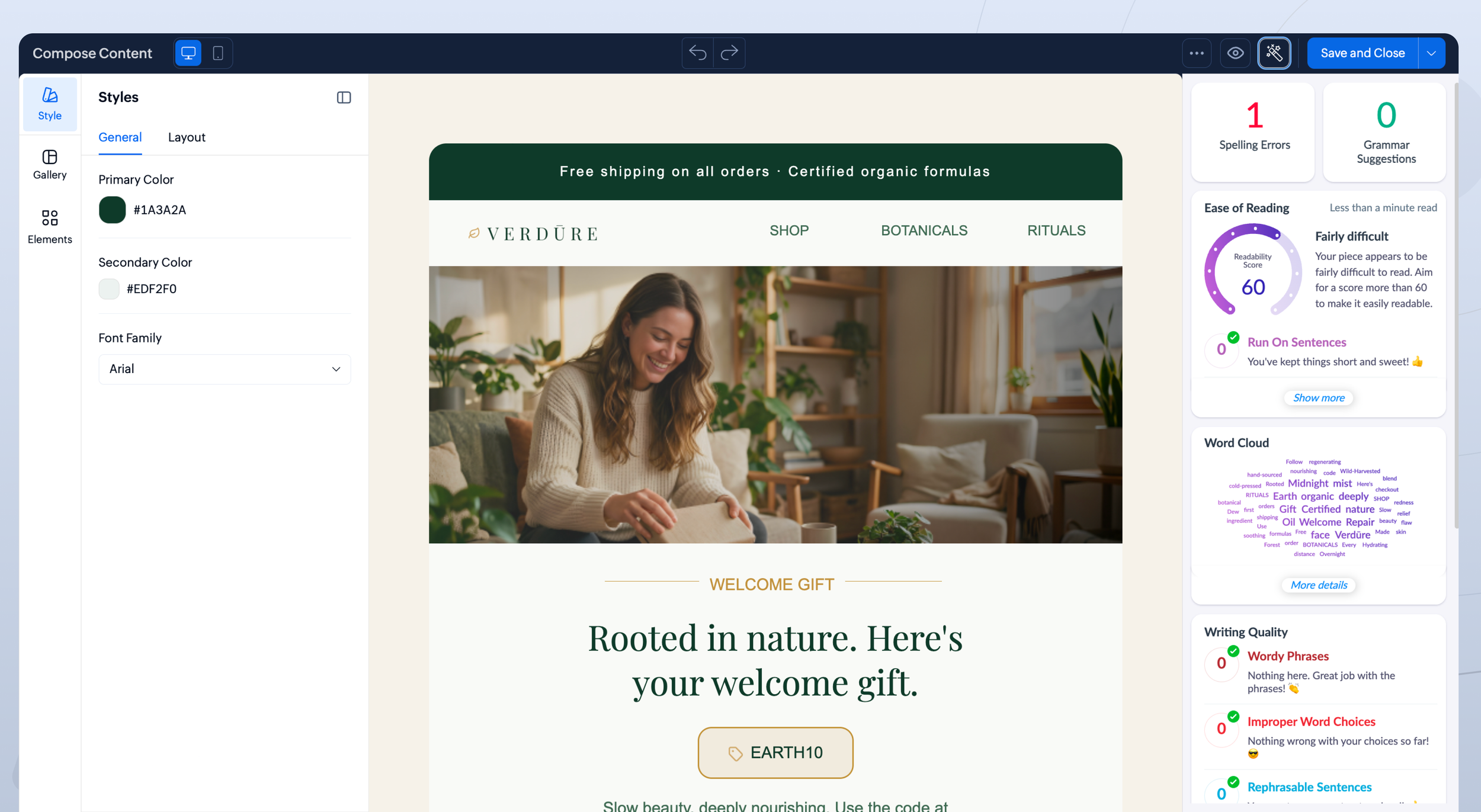
The Zia Content Analyzer is one of the first AI capabilities being introduced. It reviews campaign content for spelling, grammar, and content issues before an email is sent.
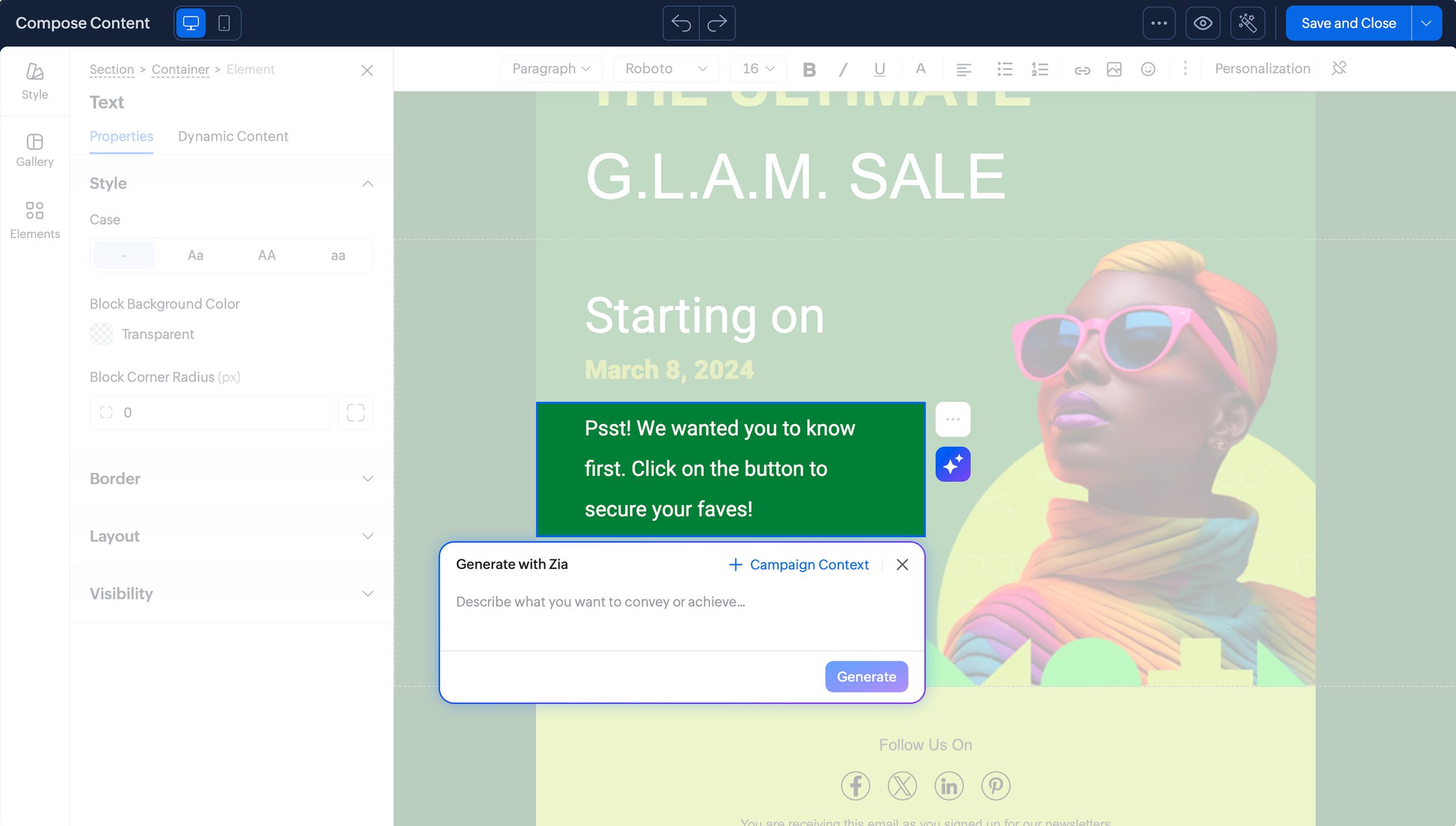
Generative AI content creation is also part of the rollout, allowing users to draft content directly inside the editor rather than always starting from a blank page.
Additional capabilities are planned, including enhanced APIs designed to support Zoho MCP Connect with other AI models, Zia Agents for custom business actions, and Zia Assistant.
The important distinction is that not all of these capabilities are available at launch.
Zoho is rolling out Campaigns 3.0 progressively, and some of the AI functionality is still coming. Businesses should evaluate what's actually available in their account rather than planning processes around features that haven't reached them yet.
What Is Available; and Who Can Use Campaigns 3.0?
This is probably the most important thing for existing Zoho Campaigns users to understand right now.
Campaigns 3.0 began its progressive data center rollout in August 2026, starting with the AU data center. However, the initial release is exclusively for new Campaigns sign-ups.
At launch, Zoho has identified several capabilities as part of the new experience, including:
Themes for centralized brand colors
Zia Content Analyzer
Frequency capping across channels
Unified contact scoring across channels
GenAI content creation, which is planned as part of the final rollout across data centers
Other capabilities, including enhanced APIs for Zoho MCP Connect, Zia Agents, Zia Assistant, and migration for existing Campaigns accounts, are still on the way.
If you already use Zoho Campaigns and don't see Campaigns 3.0, there is nothing wrong with your account. Zoho has not yet announced a finalized migration timeline for existing users.
What Businesses Should Pay Attention to Most
There are a lot of features in Campaigns 3.0, but I wouldn't approach this release by asking, "How do we start using everything?"
Instead, look at where your current marketing process has friction.
If building emails takes too much time, the redesigned editor and reusable content may be the biggest improvement for your team.
If your CRM and Campaigns audiences are difficult to keep aligned, the improved CRM sync and segmentation capabilities deserve attention.
If you're communicating through multiple channels, frequency capping and unified contact scoring could help create a much more coordinated customer experience.
And if reporting stops at opens and clicks, the deeper Analytics integration may provide the opportunity to connect marketing activity to meaningful business results finally.
The value of Campaigns 3.0 won't come from turning on every new feature. It will come from choosing the features that solve actual problems in your marketing process.
What Existing Zoho Campaigns Users Should Do Next
For now, existing Campaigns users don't need to rush into making changes. Since migration details have not yet been finalized, this is a good time to evaluate your current setup instead.
Look at your lists and segments. Review how Campaigns is synchronized with CRM. Identify outdated templates and workflows. Check whether your contact data is structured well enough to support more advanced segmentation and personalization.
That way, when Campaigns 3.0 becomes available to your account, you're not simply moving an old, messy marketing setup into a newer interface. You're using the transition as an opportunity to improve it.
Campaigns 3.0 represents a meaningful step forward for Zoho's marketing platform, particularly in the areas of usability, multi-channel communication, segmentation, CRM integration, and reporting. But as with any major platform update, the businesses that will benefit most aren't necessarily the ones that adopt every new feature first. They'll be the ones that understand what they're trying to improve and use the new capabilities intentionally. A better platform creates more possibilities, but a well-structured marketing strategy and clean, connected data are still what turn those possibilities into results.
If you're using Zoho Campaigns and aren't sure whether your current setup is ready for Campaigns 3.0, Virago Ventures can help review your current CRM sync, segmentation, templates, workflows, and marketing automation strategy so you can take advantage of the new capabilities when they become available.